Create your conversational AI agents, no code, in minutes.
Winaity AI is a no-code platform for building your chatbots and AI agents: customer service, sales, HR or IT support. Write its mission, add your documents: the agent answers 24/7 on your website, WhatsApp, Messenger or Instagram, and hands complex cases over to your team.
Connect your AI agents wherever your customers write to you.
WhatsApp, Messenger, Instagram, Telegram — and your own APIs.
Web widget
WhatsApp
Messenger
Instagram
Telegram
API
Your AI agents that work for you.
Choose a model, feed it your documents, put it live on all your channels.
Your AI agent, tailor-made. Choose a model: customer service, order tracking, B2B lead qualification, or build your own. Powered by your documents: “Here’s the answer to your question”, with its source, your documentation. On all your channels: messaging, WhatsApp and web widget lead to one single agent, which answers “Bonjour !”, “Hello!” or “¡Hola!”. An advisor takes over: the AI agent hands the conversation to a human advisor, the team is notified, and the advisor takes it from there. Your data stays private: support, HR and sales each have their own, separate knowledge base. Winaity AI: create your AI agent, at winaity.com. Voice-over: “Build an AI agent that fits your business: start from a template, or from a blank page. Your documents become its knowledge. The same agent answers on all your channels, in your customers’ language. When needed, a human advisor takes over. And your data stays private: each agent only sees its own documents. Create your AI agent today.”
Your workspace
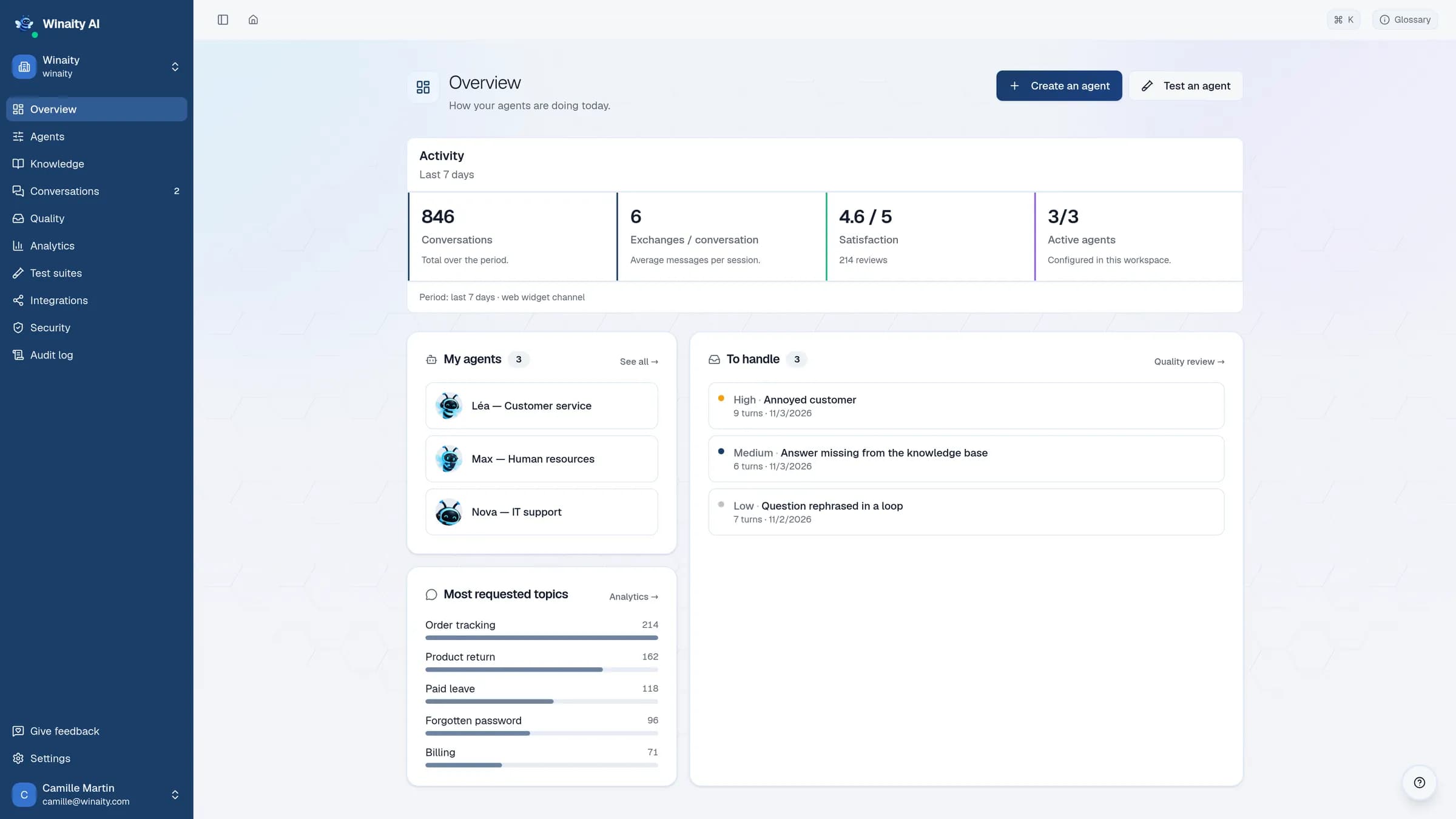
Your agents at work, at a glance.
Conversations, satisfaction, active agents and requests to take over: everything your AI agents do, on a single screen.
Winaity AI · OverviewDemo data
Winaity AI interface — sample data.
Features
Everything you need to answer quickly and effortlessly.
Setup, go-live, conversation analysis and security, on a single platform.
A
AI agents specialized by role
Create one agent for customer service, one for sales, one for HR. Each has its own instructions and its own documents, and reaches nothing else.
Recurring topics
Order tracking
Refunds
Forgotten password
Handed over to your team
Late returnFriction
Duplicate invoiceHanded over
Add to the knowledge base
Recurring topics
Volume pricing
Delivery times
Quote request
Handed over to your team
Off-list discountFriction
Key account orderHanded over
Add to the knowledge base
Recurring topics
Paid leave
Remote work
Expense reports
Handed over to your team
Payslip errorFriction
Mutual terminationHanded over
Add to the knowledge base
B
Analyze requests and friction points
Identify recurring topics and the requests handed over to your team. Use the conversations to enrich your knowledge base and fine-tune your agents.
Ask for information
Check a condition
Call a toolyes
Hand over to a humanno
C
Automate your journeys without code
Define the steps to follow in a visual editor: ask for information, check a condition, call a tool or hand the conversation over to a human.
Out-of-scope questionOut of scope
IBAN in the messageData masked
Unhappy customerHanded to your team
D
Security and GDPR compliance
Guardrails against out-of-scope requests and the disclosure of sensitive data, rules for handing over to your team.
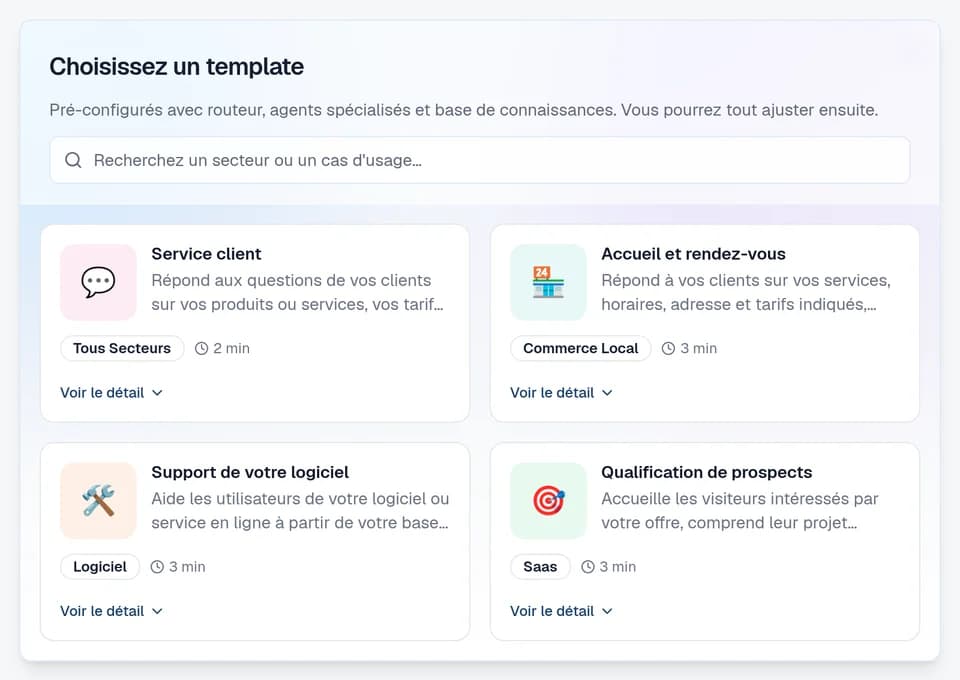
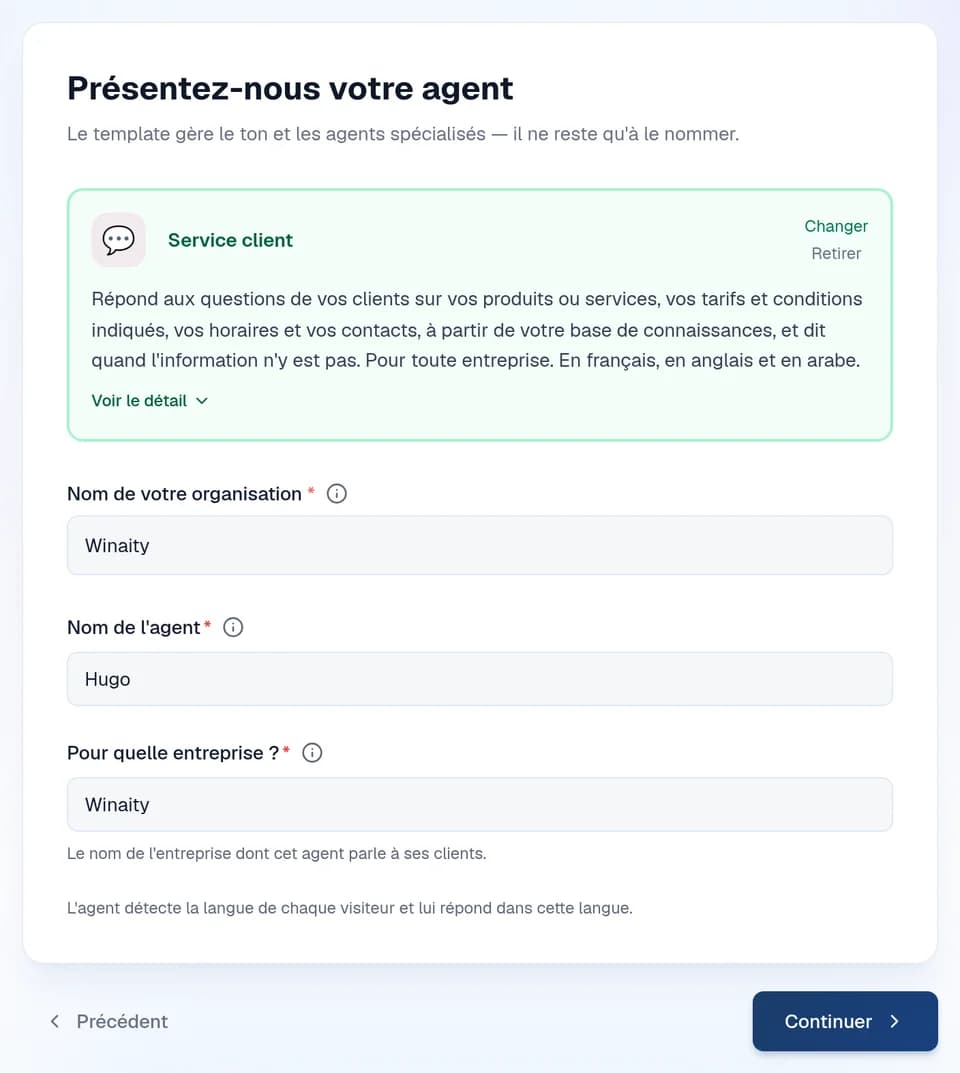
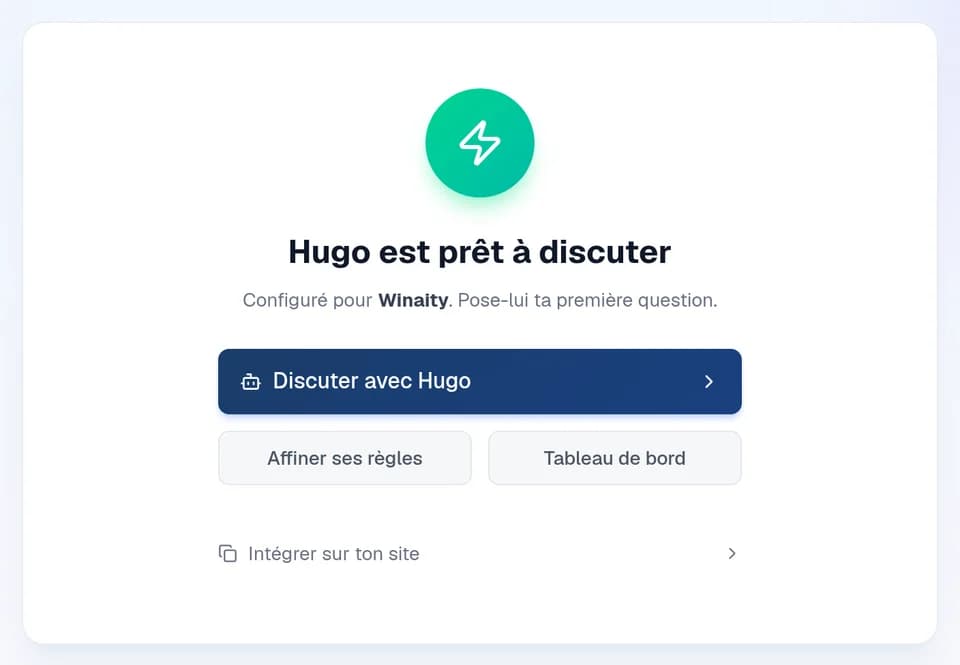
A template, a name, and your agent is ready to answer. Without a line of code.
1Choose a template
2Introduce it
3Chat
Winaity AI interface, in French — sample data.
AI agent or chatbot: what's the difference?
A chatbot recites a script, whereas our Winaity agent understands and interprets questions, looks up information in your documents and can use your tools to take action.
Scripted chatbot
Follows a decision tree written in advance
Only understands the phrasings it expects
Shows prewritten text, with no way to act
An off-script question leads to a dead end
Winaity AI agent
Understands a question asked in any words
Looks for the answer in your real documents
Calls an API, opens a ticket, takes action
Hands over to a person when it isn't sure
Wherever your teams answer the same questions, an AI agent takes over.
Customer service, HR, IT support, sales, administrative procedures: whatever your line of work, your agent is set up from a template or a blank page, with your own documents. Here are the kinds of questions it handles.
Your customers ask where their order is, how to return an item, when they will be refunded. The agent reads your documentation and your terms of sale, then answers in the widget on your website and on WhatsApp. Wired to your tracking API, it gives the real status of the order instead of a generic reply. If the customer asks to speak to someone and you have enabled it, the agent notifies members of your team at their email address, with a link to the conversation; otherwise it points them to your customer service address or says it cannot put them in touch.
Leave, health cover, expense claims, remote work: the same questions occupy your HR team all year long. The assistant draws on your knowledge base — collective agreement, internal rules, onboarding guide — and answers on the web and on WhatsApp, at the moment the employee asks. If you enable it, an employee who asks to speak to someone gets members of your HR team notified at their email address, with a link to the conversation.
Forgotten password, VPN refusing to connect, access to an internal tool: tier 1 is repetitive, and that is exactly what makes it automatable. The agent walks the user through it step by step from your internal documentation, then opens a ticket in any ticketing tool that exposes an HTTP API, through a REST call declared in a flow. If escalation is enabled, a keyword such as “security incident” can start a flow that hands the conversation straight to your team.
A visitor leaves their details at 11 p.m.; your sales rep calls back two days later. The agent starts the conversation straight away, on your website or on WhatsApp, qualifies the need, the budget and the timeline against the BANT framework, then, if they want to talk to your team, gives them your booking link or your sales team's address. Conversations that go nowhere remain usable in analytics: topics raised, sentiment, resolution and escalation rates.
Take the guide with you. 10 uses of AI for your business
Real cases for customer service, sales, HR and IT support. Free, sent by email, to read whenever you like.
Frequently asked questions about conversational AI agents
The questions people ask before opening an account. Anything about plans and billing is covered on the Pricing page.
Where is my data hosted?
Your document base and its vector index are hosted by us, in a collection specific to your organisation, and no tool enabled by default reaches an outside host.
Do I need a developer to create an AI agent?
Not for the configuration: creating the agent, importing the knowledge base, writing escalation rules and conditional journeys all happen in the interface, without a line of code. Displaying the widget means pasting a code snippet into your website, the standard job of a web integrator. Wiring an internal API into a journey, on the other hand, does take somebody who knows that API.
How long does it take to deploy an AI agent?
About fifteen minutes, once the account is created, for an agent started from an official template: pick the template, fill in its variables — company name, contact email, opening hours — test it in the built-in test space, put the widget on your site. The real timeline depends mostly on the state of your documentation: that is what the agent reads in order to answer, and nobody can write it for you.
Which channels can an AI agent answer on?
The web widget, WhatsApp, Messenger, Instagram and Telegram. An agent is configured once: its knowledge base, its journeys and its escalation rules apply to all these channels, with no need to duplicate it. The widget switches on from the dashboard, on every plan. WhatsApp, Messenger, Instagram and Telegram, included from the Pro plan, connect from the Integrations page: for WhatsApp, it takes a Meta Business account and the credentials of your WhatsApp Business number; for Messenger and Instagram, your Facebook login, a Page and, for Instagram, a professional account linked to that Page; for Telegram, the token of a bot created with @BotFather. On Messenger, Instagram and Telegram the agent reads and writes text: attachments are not read. Finally, the REST API lets you open a channel of your own making.
What happens when the agent does not know the answer?
It draws on your knowledge base. By default, an anti-hallucination safety net compares its answer with that base, when the base was consulted before the answer, and removes the sentences the base does not confirm. An administrator can adjust it agent by agent, down to switching it off. It lowers the risk of invented answers, it does not rule it out. You define, agent by agent, what triggers an escalation and who is notified: members of your team, at their email address and with a link to the conversation, or your ticketing tool. The agent tells the visitor their request has been passed on; with no escalation configured, it says so and keeps helping. Questions the base could not cover surface in the Quality page, to tell you what to add to your knowledge base.
PDF, Word, Excel and CSV files, plain text, HTML or Markdown, a URL or a sitemap with its exclusions (500 pages per import, within your plan's quota). Only the text of a PDF is read: a scanned page adds nothing. PowerPoint presentations are not accepted: convert them first, to PDF for example. Each document belongs to the agent you import it into.
Does an AI agent replace the support team?
No: it takes on the repetitive questions and hands over the rest, notifying your team or your ticketing tool, if you enable it. Analytics show the resolution rate, the share of conversations handed over and the topics that come up most: enough to decide what to document next.
Where is my data hosted?
Your document base and its vector index are hosted by us, in a collection specific to your organisation, and no tool enabled by default reaches an outside host.
Do I need a developer to create an AI agent?
Not for the configuration: creating the agent, importing the knowledge base, writing escalation rules and conditional journeys all happen in the interface, without a line of code. Displaying the widget means pasting a code snippet into your website, the standard job of a web integrator. Wiring an internal API into a journey, on the other hand, does take somebody who knows that API.
How long does it take to deploy an AI agent?
About fifteen minutes, once the account is created, for an agent started from an official template: pick the template, fill in its variables — company name, contact email, opening hours — test it in the built-in test space, put the widget on your site. The real timeline depends mostly on the state of your documentation: that is what the agent reads in order to answer, and nobody can write it for you.
Which channels can an AI agent answer on?
The web widget, WhatsApp, Messenger, Instagram and Telegram. An agent is configured once: its knowledge base, its journeys and its escalation rules apply to all these channels, with no need to duplicate it. The widget switches on from the dashboard, on every plan. WhatsApp, Messenger, Instagram and Telegram, included from the Pro plan, connect from the Integrations page: for WhatsApp, it takes a Meta Business account and the credentials of your WhatsApp Business number; for Messenger and Instagram, your Facebook login, a Page and, for Instagram, a professional account linked to that Page; for Telegram, the token of a bot created with @BotFather. On Messenger, Instagram and Telegram the agent reads and writes text: attachments are not read. Finally, the REST API lets you open a channel of your own making.
What happens when the agent does not know the answer?
It draws on your knowledge base. By default, an anti-hallucination safety net compares its answer with that base, when the base was consulted before the answer, and removes the sentences the base does not confirm. An administrator can adjust it agent by agent, down to switching it off. It lowers the risk of invented answers, it does not rule it out. You define, agent by agent, what triggers an escalation and who is notified: members of your team, at their email address and with a link to the conversation, or your ticketing tool. The agent tells the visitor their request has been passed on; with no escalation configured, it says so and keeps helping. Questions the base could not cover surface in the Quality page, to tell you what to add to your knowledge base.
PDF, Word, Excel and CSV files, plain text, HTML or Markdown, a URL or a sitemap with its exclusions (500 pages per import, within your plan's quota). Only the text of a PDF is read: a scanned page adds nothing. PowerPoint presentations are not accepted: convert them first, to PDF for example. Each document belongs to the agent you import it into.
Does an AI agent replace the support team?
No: it takes on the repetitive questions and hands over the rest, notifying your team or your ticketing tool, if you enable it. Analytics show the resolution rate, the share of conversations handed over and the topics that come up most: enough to decide what to document next.
Ready to deploy your AI agents?
Create your account for free. 30 conversations a month, forever. 1 free AI agent